HomeCase studiesMy outreach system
Something I built · AI and automation
My outreach system
From finding the right companies to a tailored email draft and a tidy sales pipeline, with a person approving every email.
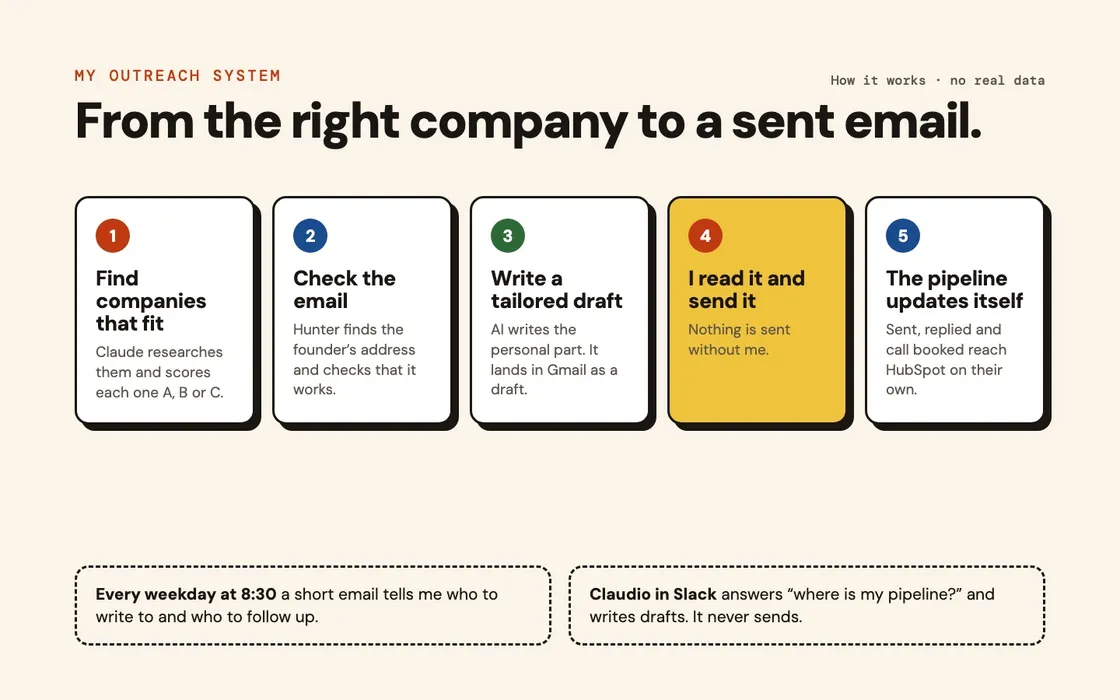
How it works, drawn for this page. No real data.
What I did
Finding the right companies
I describe the companies I want in plain words. Claude researches them, scores each one A, B or C on how well it fits, and adds them to a table. Only the best fits move on.
The right email address, checked
Hunter finds the founder's email address and checks that it works. Addresses it is not sure about are held back, so I do not email the wrong person or damage my sending domain.
A tailored draft, never an automatic send
AI reads the company's website and writes the personal part of the first email. The rest follows rules I wrote, in my own tone. The email lands in Gmail as a draft. I read it, change it if I want, and send it myself.
A pipeline that updates itself
When I send an email, a contact and a deal appear in HubSpot. When someone replies, the deal moves on. When a call lands in my calendar, it moves again. Every weekday at 8:30 a short email tells me who to write to, who to follow up and which calls are coming.
A sales assistant in Slack
Claudio is an AI agent I built in one day. I message it from my phone: “where is my pipeline?”, or “draft a follow-up to this client”. It reads HubSpot and my email and writes drafts. It never sends, and changes to a deal wait for my approval. It costs about $10 to $15 a month to run.
What came of it
Results.
Figures belong to this engagement and this client. Nothing here is an average or a benchmark, and no number appears without the work behind it described above.
What I took from it
Automation is good at the slow parts: research, checking and record keeping. The part that wins the reply, deciding what to say to one person, I keep for myself.
Something similar, at your company?
If I am not the right fit, I will say so on the call and tell you who is.