HomeCase studiesHQ, my private dashboard
Something I built · Internal tool
HQ, my private dashboard
One private page I run my business from: analytics, the blog plan, drafts to approve and a map of every tool.
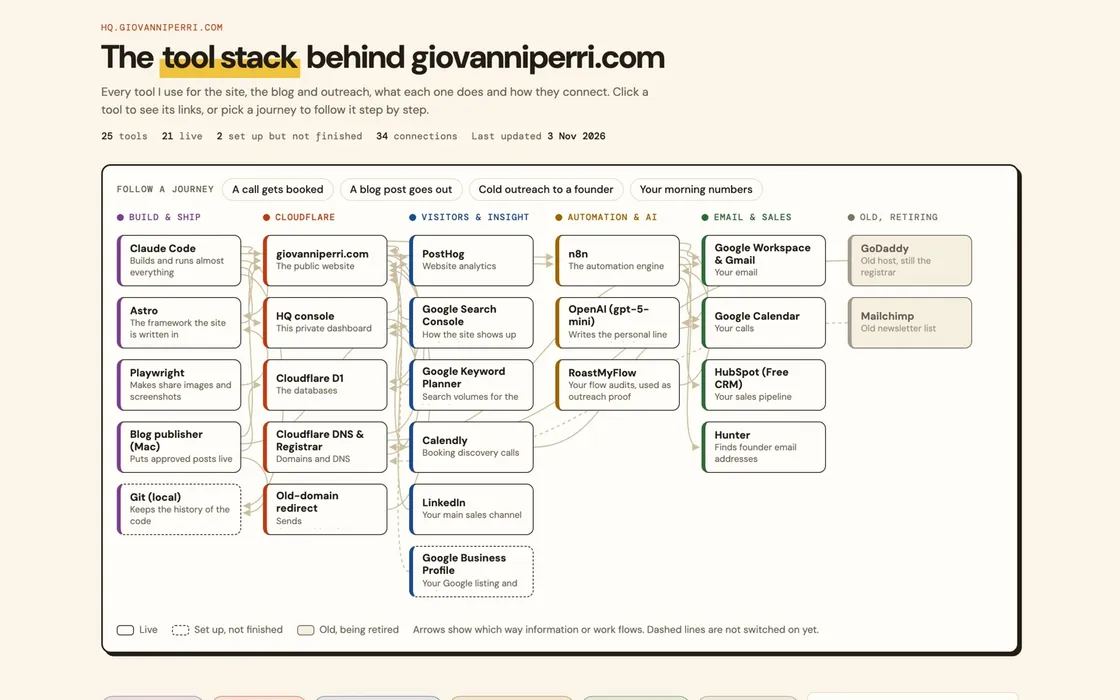
HQ’s tool stack map, as it looks today.
What I did
One page in the morning
The home page shows each part of the business as a card: site analytics, the content plan, the build timeline, blog drafts to review and the tool stack. Each card shows the one or two numbers that matter, and opens the full page.
The numbers and the content in one place
HQ is where the site's analytics arrive every morning and where the blog is planned, reviewed and approved. Both have their own case studies: this site's analytics, and my blog pipeline.
A map of every tool
The tool stack page lists every tool behind the site, the blog and outreach, what each one does and how they connect. It is how I keep track of costs and of what breaks when one tool changes.
What came of it
Results.
Figures belong to this engagement and this client. Nothing here is an average or a benchmark, and no number appears without the work behind it described above.
What I took from it
The most useful dashboard is the one you open every day. That means few numbers, each with a link to the work behind it.
Something similar, at your company?
If I am not the right fit, I will say so on the call and tell you who is.